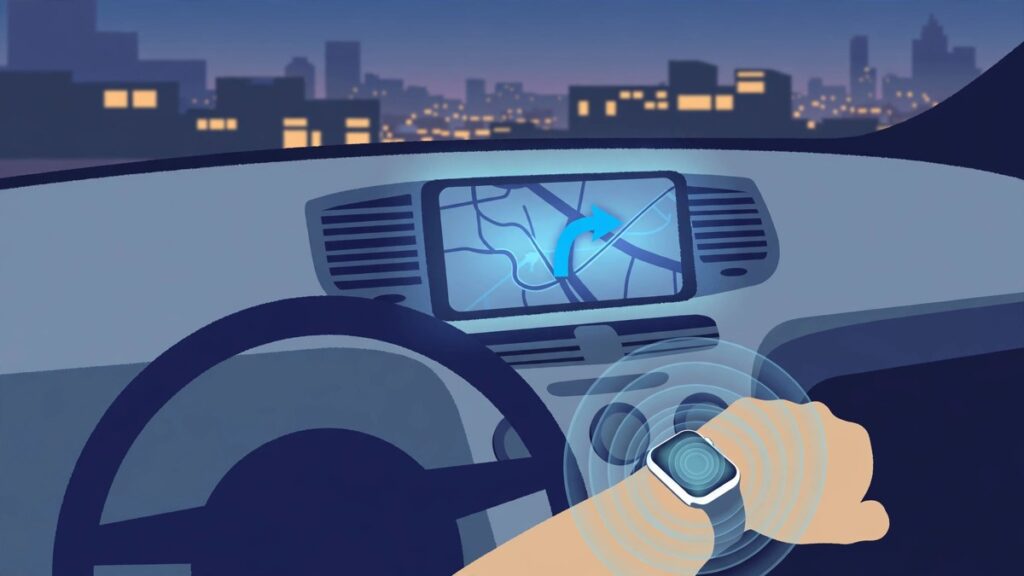
When Apple Maps is navigating through CarPlay, your Apple Watch can tap your wrist just before each turn, giving you a second cue alongside the dashboard display and spoken directions. Different vibration patterns signal left and right turns, so the nudge works even when music is loud or your eyes are on the road.
The alerts are usually switched on by default once the watch is set up, according to Engadget, and they can be checked in the Watch app on the iPhone under My Watch, then Apps, then Maps, where there is a toggle for Driving with CarPlay alongside walking and cycling alerts. The same haptics work in the watchOS version of Apple Maps when navigating without the car, though CarPlay itself cannot run from the watch alone.
The feature is one reason some drivers now prefer Apple Maps in the car. MakeUseOf reports that neither Google Maps nor Waze sends haptic navigation alerts to an Apple Watch, so switching apps means losing the wrist taps entirely, and Apple Maps also adds on-device Preferred Routes and a parked-car marker in recent software.
Why it matters
The value of a wrist tap is easy to miss until you have driven a long, unfamiliar road at night. A dashboard arrow demands a glance, and a voice prompt can be drowned out by music, children or road noise, but a tap on the wrist is private, silent and hard to ignore. For drivers who nod off on motorways or miss a turnoff in heavy traffic, that extra channel of information is a genuine safety feature rather than a gimmick, and it costs nothing beyond hardware many Apple users already own.
It is also a quiet lesson in how platform advantages are built. Google Maps is the stronger map in many countries, with better search and more complete business data, yet Apple wins this particular comparison by owning the whole stack: phone, watch, car screen and voice assistant. Each piece is ordinary on its own, but together they produce something a rival app cannot copy without Apple's permission, which is exactly why ecosystem lock-in is so hard to compete against.
There is a caveat worth stating plainly. Some drivers report that the wrist alerts stop working once CarPlay takes over, because Apple routes driving notifications to the car display instead of the watch, and the behaviour is not consistent across cars and setups. If your taps vanish, check the Maps alerts in the Watch app first, and remember that the feature is a supplement to the dashboard, not a replacement for it.
The broader direction is clear: navigation is moving off the screen and onto the body. Haptics, audio and glanceable widgets are replacing the habit of staring at a map, and the carmakers and phone makers that coordinate those channels best will shape how the next generation of drivers finds its way.
What to watch next
Watch whether Google adds haptic turn alerts for Apple Watch, or whether Apple opens the capability to third-party navigation apps. Either move would end Apple Maps' small but real advantage in the car.
Watch future watchOS and CarPlay updates too. Apple keeps adding driving features, from Preferred Routes to the parked-car widget, and each one tightens the case for staying inside its ecosystem.
Frequently asked questions
How do Apple Watch turn alerts work with CarPlay?
When Apple Maps navigates through CarPlay, the watch taps your wrist before each turn, using different vibration patterns for left and right, in sync with the car’s audio and visual alerts.
How do I turn Apple Watch CarPlay alerts on or off?
Open the Watch app on your iPhone, go to My Watch, then Apps, then Maps, and toggle alerts for Driving with CarPlay, as well as walking and cycling.
Can I run CarPlay from my Apple Watch alone?
No. CarPlay needs an iPhone, and even the newest watches lack the power and the USB connection to run it. You can get turn-by-turn directions from the watch itself with the same haptics.
Does Google Maps offer the same wrist taps?
No. According to MakeUseOf, neither Google Maps nor Waze sends haptic navigation alerts to an Apple Watch, so the feature is specific to Apple Maps.